

Stop Fighting for a Mac Mini! Deploy Your OpenClaw (Clawdbot) on Qiniu Cloud for Just ¥8.8

OpenClaw
OpenClaw (also known as Clawdbot, Moltbot),The AI Bot
Editor's Note: Free consultation for Clawdbot deployment is available. See the contact information at the end of this article.
Early 2026 has been set ablaze by an open-source project: Clawdbot (now renamed OpenClaw, formerly known as Moltbot). In just 20 days, its GitHub Stars skyrocketed to over 120K. This isn’t just another chatbot; it’s an “AI Employee” capable of directly controlling computers, reading and writing files, and even managing GitHub and schedules via plugins.
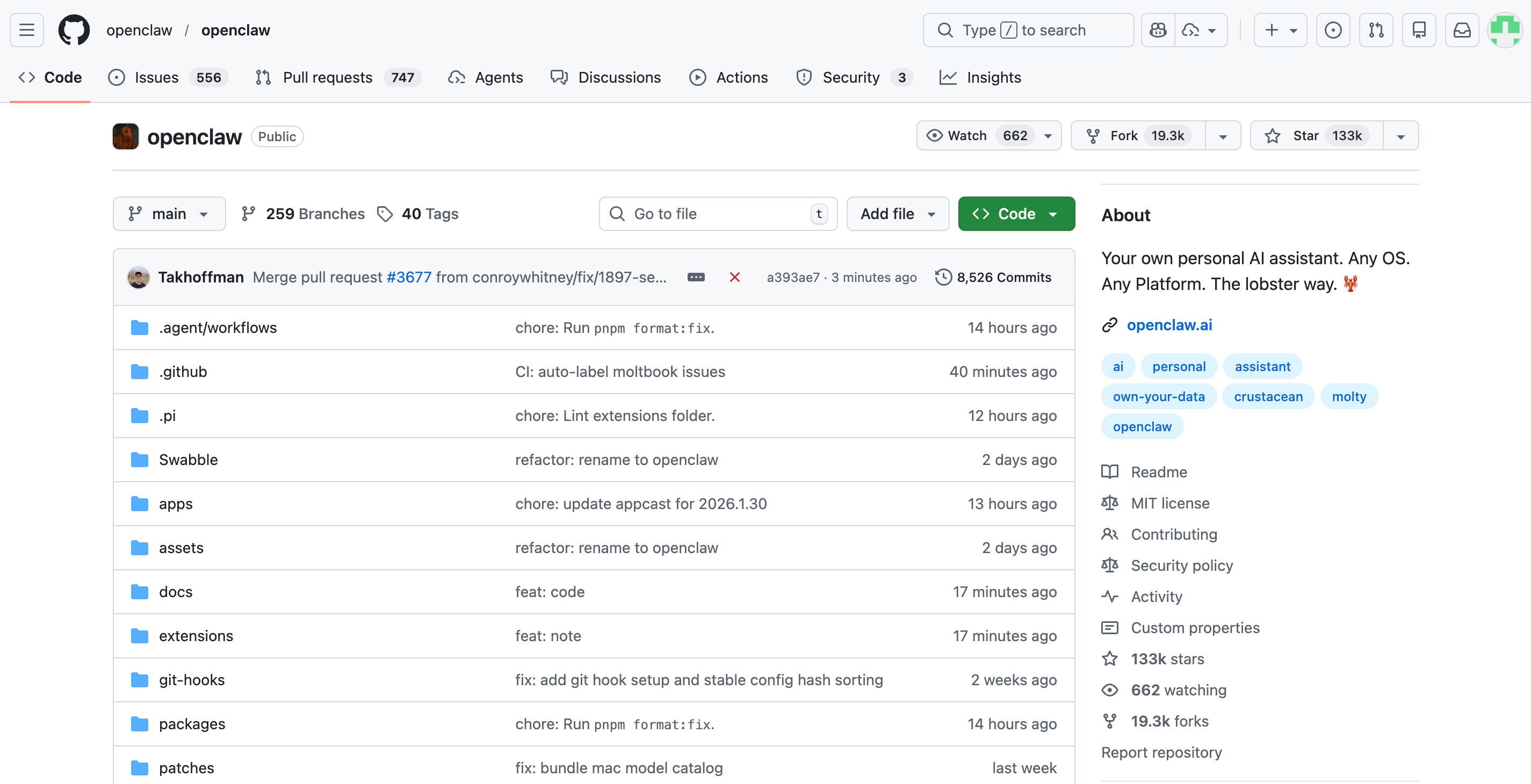
Many are rushing to buy M4 Mac Minis to run it 24/7, causing stock shortages in some regions. But as geeks, we have a more elegant and cost-effective solution: cloud deployment.
Today, I’m bringing you a step-by-step tutorial on how to use Qiniu Cloud’s LAS + MaaS to have an always-on AI assistant for less than the price of a cup of coffee per month.
I. Why Choose the Qiniu Cloud Solution?
While local deployment (like a Mac Mini) is convenient, it faces challenges such as power outages, lack of a public IP, and high hardware costs. Qiniu Cloud’s “Compute + Model” one-stop solution solves these issues:
- LAS (Full-stack Application Server): Provides a dedicated OpenClaw image, ready to use, starting at just ¥8.8/month.
- MaaS (Model as a Service): Aggregates 92 world-leading models including Claude 4.5, GPT-5.2, and DeepSeek-V3.2, eliminating the need for complex API setups.
- Zero Friction: Comes with a public network environment, no need for NAT traversal.
Claim Your Benefits: Register through my exclusive link https://s.qiniu.com/zqyMj2 to get 10 million free tokens and a ¥100 server voucher.
II. 3-Minute Quick Deployment Tutorial
Step 1: Create a LAS Instance
-
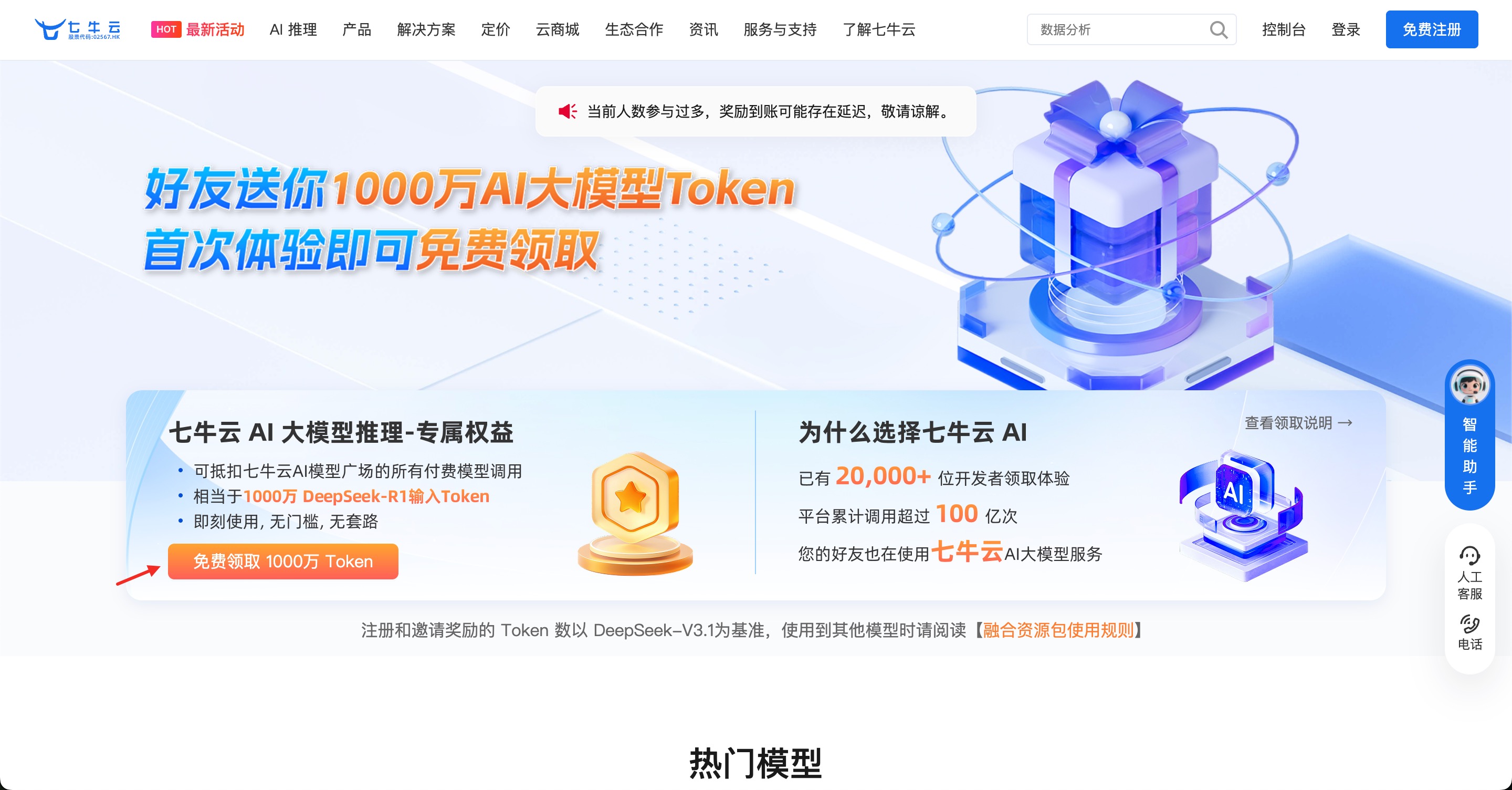
Visit the website and click the button shown below to claim 10 million free tokens: https://s.qiniu.com/zqyMj2
-
Open the Qiniu Cloud Console: https://portal.qiniu.com
-
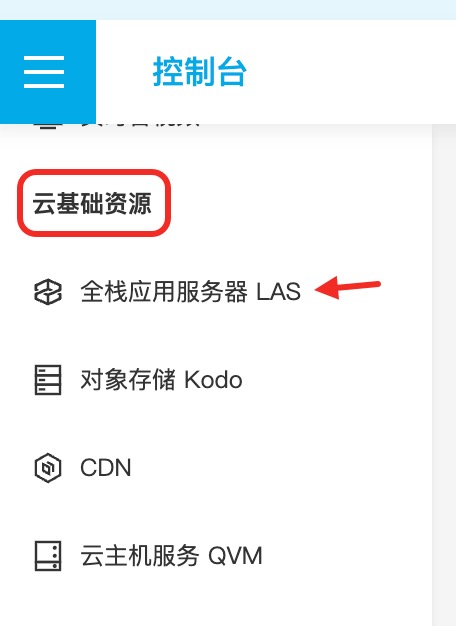
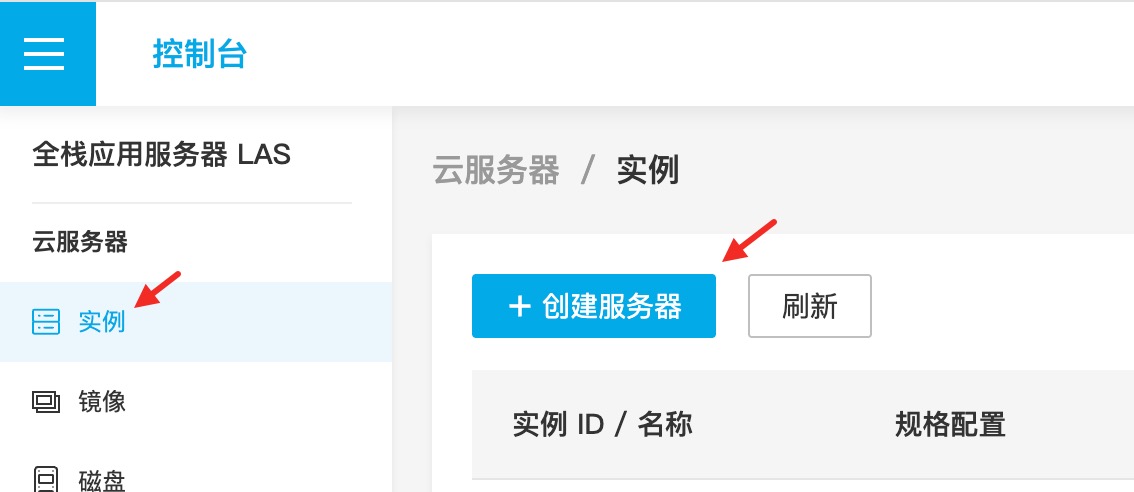
Navigate to “Cloud Infrastructure - Full-stack Application Server LAS” and click “Create Server”.
-
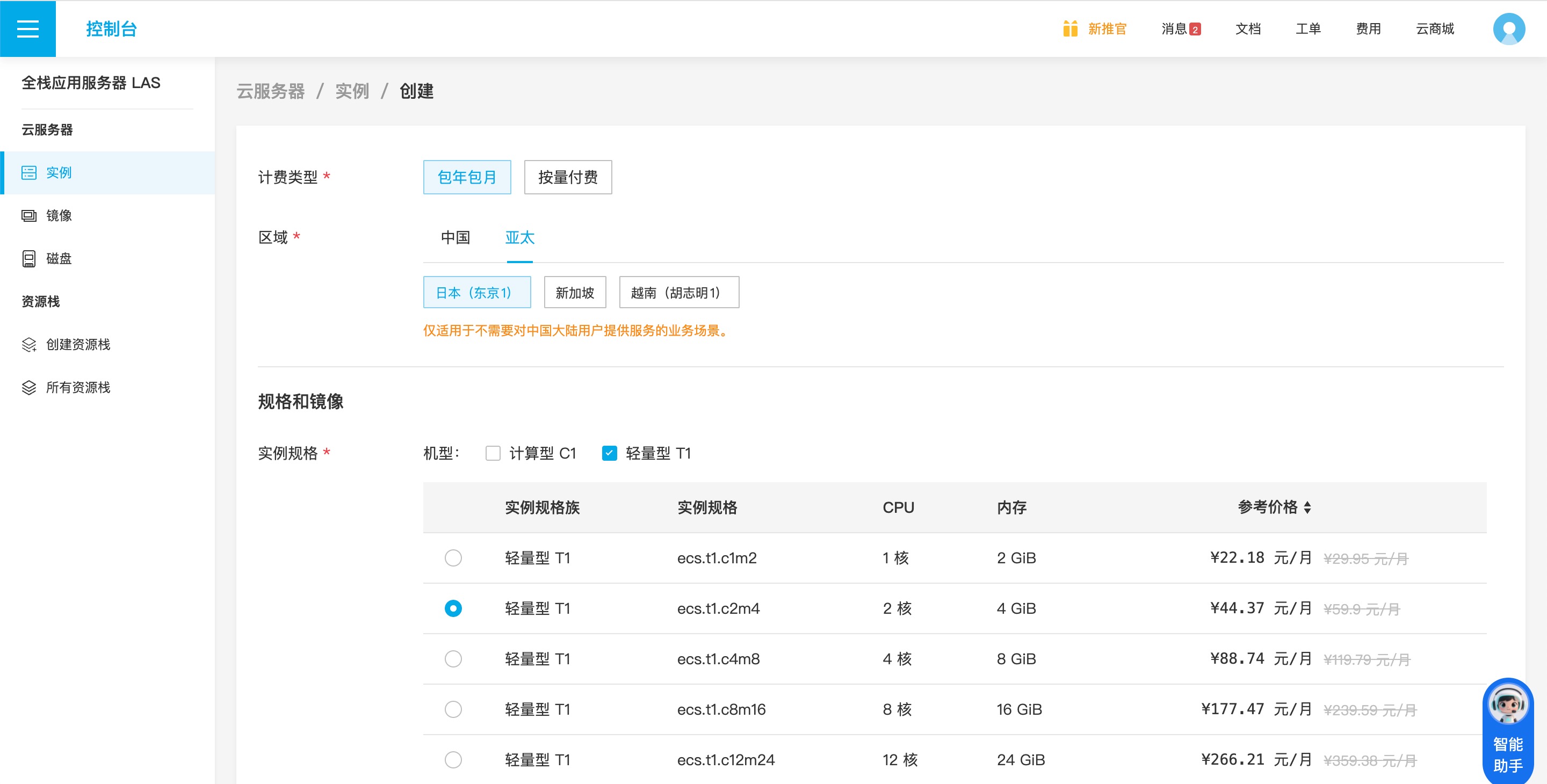
Select a plan.
-
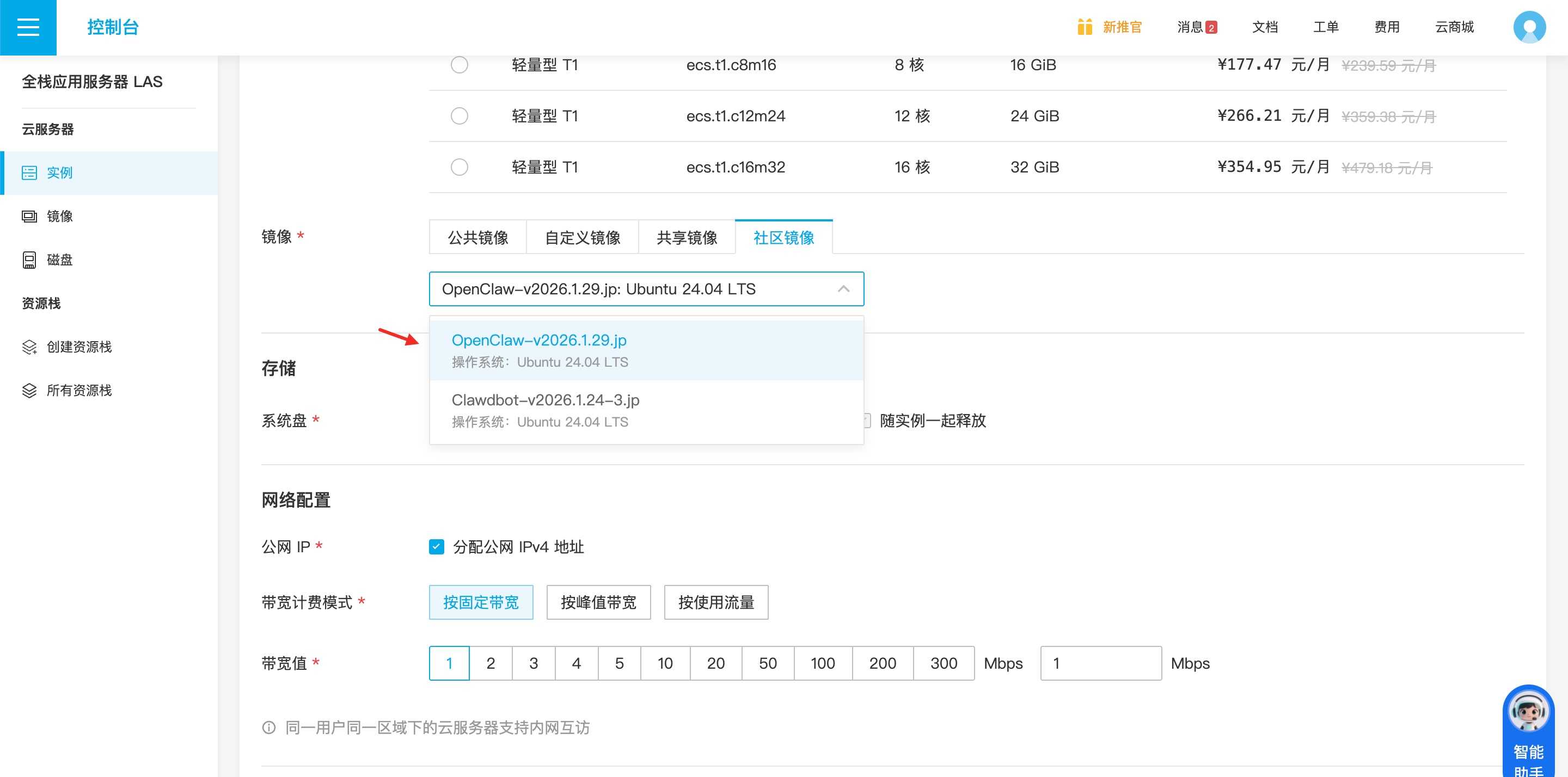
Key Point: When choosing an image, select the Community Image: OpenClaw-v2026.x.x.
-
Set your password and click “Buy Now”.
Step 2: Installation and Initialization
Go to the instance details page, click “Remote Connection”, and run the following in the terminal:
# 1. Create a dedicated clawdbot account and switch to it
adduser clawdbot && usermod -aG sudo clawdbot && su - clawdbot

# 2. Enable background persistence
loginctl enable-linger

# 3. Start installation (follow the wizard to scan the QR code)
openclaw onboard --install-daemon
Step 3: Configure Qiniu Cloud MaaS Models
OpenClaw’s intelligence depends on the model. We need to connect to Qiniu’s MaaS API via the configuration file:
- Edit the config file:
nano ~/.openclaw/openclaw.json- Add the Qiniu configuration in the
modelssection (replace with yourapiKey):
"models": {
	"mode": "merge",
	"providers": {
		"qiniu": {
			"baseUrl": "https://api.qnaigc.com",
			"apiKey": "sk-YOUR-QINIU-API-KEY",
			"api": "anthropic-messages",
			"models": [
				{
					"id": "deepseek/deepseek-v3.2",
					"name": "DeepSeek-V3.2",
					"reasoning": false,
					"input": ["text"],
					"contextWindow": 128000,
					"maxTokens": 32000
				}
			]
		}
	}
}
Get your API Key here: https://portal.qiniu.com/ai-inference/api-key
- Save, exit, and run:
openclaw gateway restart
openclaw models set qiniu/deepseek/deepseek-v3.2
Step 4: Access the Dashboard (via Local SSH Tunnel)
Run the SSH tunnel on your local terminal:
ssh -N -L 18789:127.0.0.1:18789 clawdbot@<YOUR_LAS_IP>Then visit in your browser:
http://localhost:18789/?token=<YOUR_TOKEN>Done! Your AI Employee is now online.
III. Advanced: Connect to Feishu for Real-time Control
To command your AI as easily as chatting, you can connect it to Feishu (Lark) via a plugin. Main steps:
- Create a Feishu App: Create a new app on the Feishu Open Platform and note down the
App IDandApp Secret. - Install Plugin: Clawdbot Feishu Plugin: https://github.com/m1heng/clawdbot-feishu.git, follow the installation guide.
- Modify Config: Add Feishu configuration to the
channelssection in~/.openclaw/openclaw.json:
"channels": {
	"feishu": {
		"enabled": true,
		"appId": "YOUR_APP_ID",
		"appSecret": "YOUR_APP_SECRET",
		"domain": "feishu",
		"connectionMode": "websocket",
		"dmPolicy": "pairing",
		"groupPolicy": "open",
		"requireMention": true,
		"mediaMaxMb": 30,
		"renderMode": "card"
	}
}- Configure App Permissions: Enable bot capabilities in the Feishu back-end, grant required message permissions, and subscribe to relevant events.
- Test in Group Chat: Add the bot to a group, @ it, and ask for an introduction. A successful reply means you’re good to go.
IV. Core Advantages: Execution Over Conversation
OpenClaw deployed on Qiniu Cloud offers several killer features:
- Memory System: Daily Logs (
memory/YYYY-MM-DD.md) and Long-term Memory (MEMORY.md) to track preferences and conversations. - Skills Extension: Connect to Brave Search, Gmail, GitHub, Google Calendar, and more via ClawdHub.
- Cron Jobs: Configure automated tasks, such as sending a daily calendar summary and top 5 unread emails every morning at 8 AM.
- Model Switching Strategy: Use Claude Opus for complex reasoning and DeepSeek for daily tasks to optimize costs.
V. Security Recommendations
- Isolated Environment: Don’t run OpenClaw directly on your main machine; use a cloud instance to keep your local environment safe.
- Remote Access: Do not expose OpenClaw directly to the public internet. Use SSH tunnels, Tailscale, or Cloudflare Tunnel.
- Device Pairing Mode: Set
"dmPolicy": "pairing"to ensure new devices require manual approval. - Regular Audits: Run
openclaw security auditandopenclaw doctorto check your configuration. - API Key Management: Follow the principle of least privilege and revoke keys immediately if compromised.
Benefits and Conclusion
OpenClaw represents a new paradigm in human-computer interaction: evolving from “dialogue” to “system-level execution.” With Qiniu Cloud LAS, anyone can have a 24/7 AI workstation at an extremely low cost.
Benefits: Register via the exclusive link to get 10 million tokens and potential vouchers: https://s.qiniu.com/zqyMj2.
If you encounter issues during installation, contact me via the email on the “About” page. Provide a detailed description of your problem and your QQ or Telegram handle for free deployment assistance.
Email Format:
Subject: [clawdbot] Deployment Issue Inquiry
Content:
Description of the issue encountered.
Contact info: Your QQ or Telegram handle
Qiniu Account Name (optional)